Predesigned ACE Payloads for Animal Crossing
This page includes several custom-curated PowerPC payloads that are designed to be executed via Animal Crossing's standalone ACE exploit.
Each payload below contains manual instructions explaining how to execute them on vanilla hardware with nothing but a controller. Currently, every payload here was written by me and confirmed to work on a vanilla GameCube or Wii without harming your save.
Unlock the Test Map Select Opens the game's hidden test map selection screen and visit unused beta maps 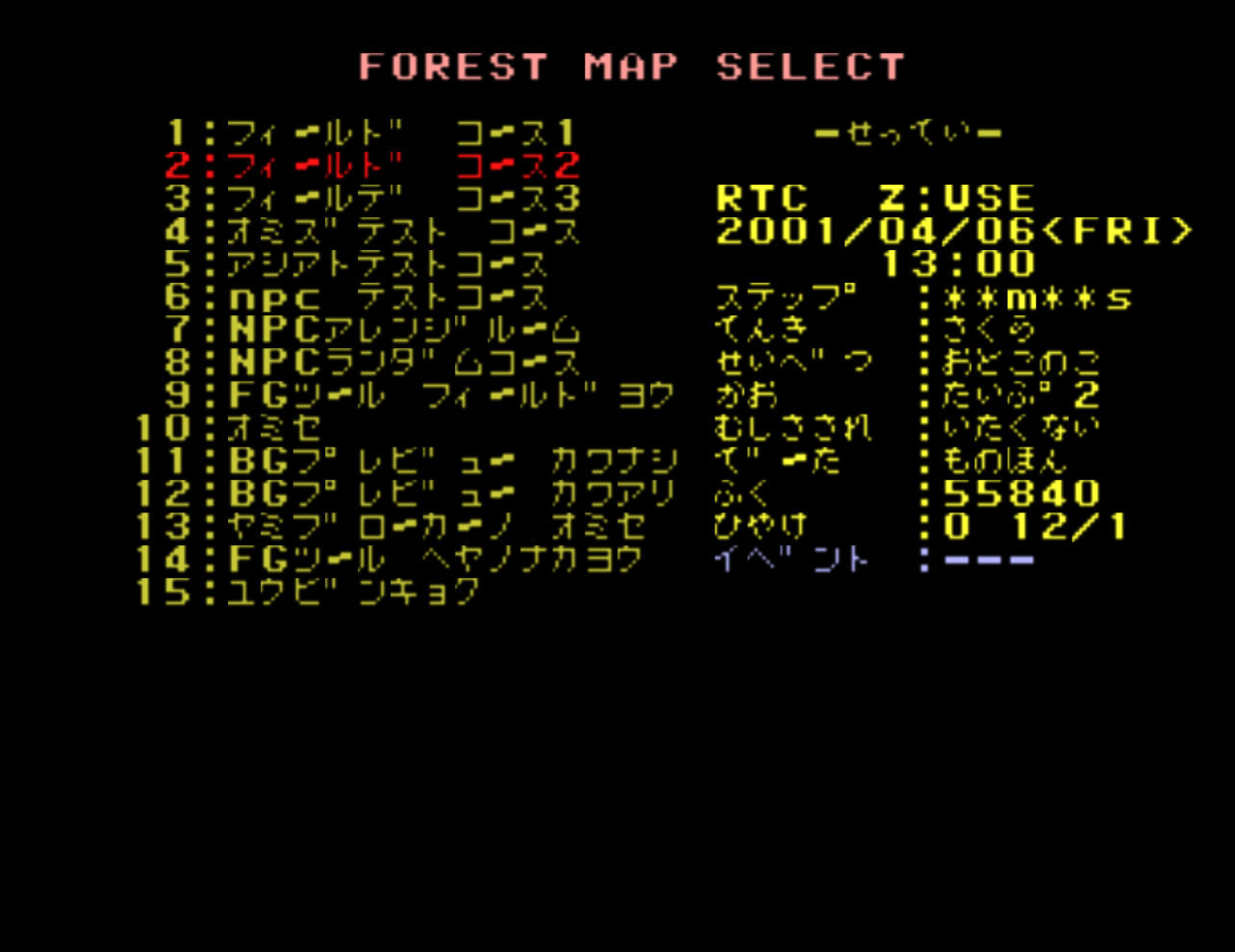
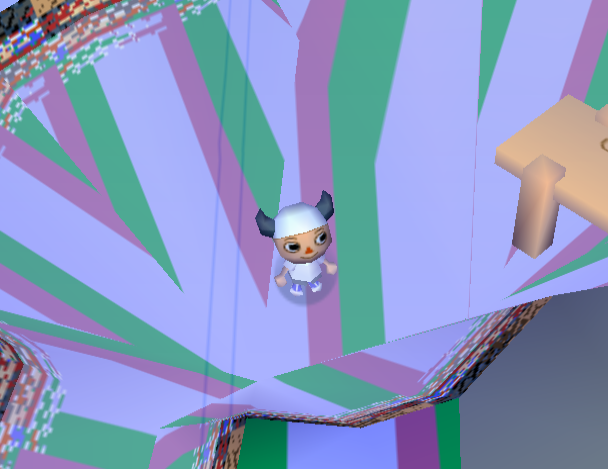
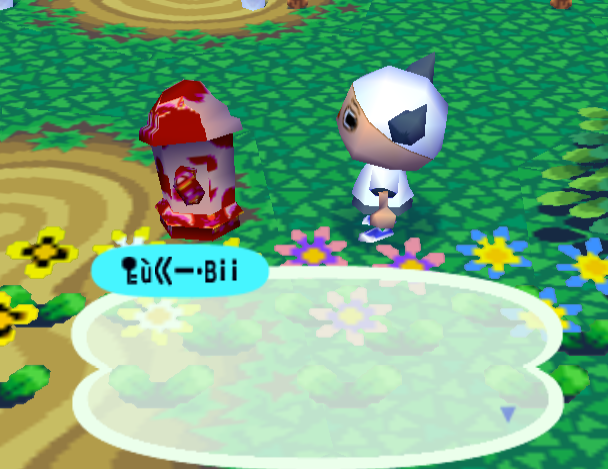
This payload redirects the game's map-loading path to a hidden test map selector. After setup, this will install a resist-persistent patch and restart your game automatically. Progress past the title screen to be brought to the test map select screen. You can load this screen at any time by entering or exiting any building, or by pressing the reset button on your console. To get rid of this exploit, power-cycle your console by turning it off completely before booting back into the game.
Manual setup instructions for controller
If your save already has a second player's October diary entry set up, steps 1-3 can be skipped
- If your save does not have a second resident, create one through the startup villager and complete the tutorial until you can enter entries in your diary.
- Enter town as the second resident and create a diary entry in October by interacting with any diary. Fill it with exactly 350 filler characters. Immediately after those characters, type
!iDQ!iDS. - Save and quit back to the title screen. Re-enter town as the first resident.
- Open the notice board in the middle of all the houses. Fill it with dummy posts until it is capped at 15/15 entries.
- With the notice board full of posts, add new entries and type the following notice board posts in order. When every post is entered, the entries should align as follows:
Enter the following characters EXACTLY as they appear from left to right. If you aren't sure where a character is in-game, click on any individual character below to show its exact position on the default keyboard.Do not confuse the upside-down exclamation (
¡) with lowercasei.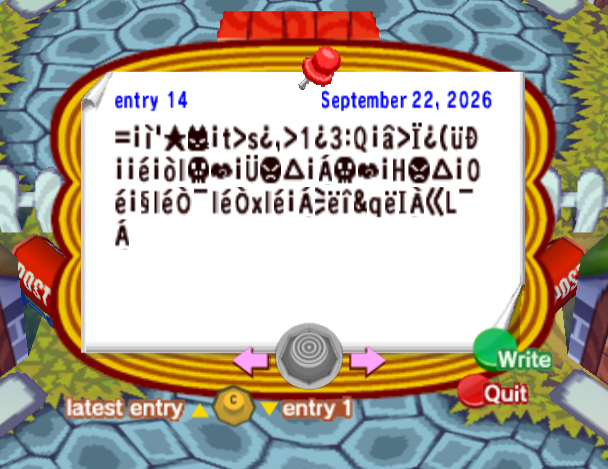
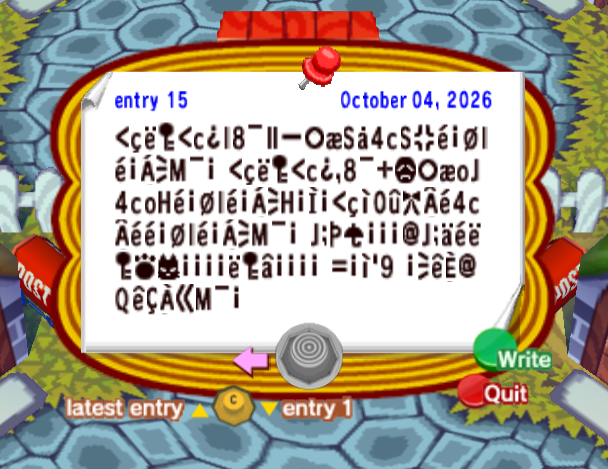
- If the current date is not already the 4th, save and quit, then set the in-game date to the 4th of any month.
- Go to Tom Nook's shop and tell him the following secret code:
x@52ylLzGNNyED UgUGK@n52C2AOn - Advance the dialogue and press A or B when Tom Nook starts repeating characters to trigger the payload.
- The game should reset. Progress past the title screen to enter the test map select.
Raw payload bytes
Post 14 of 15
76 bytes @ 0x8126FF543D 00 81 27 B9 C8 00 74 3E 73 01 2C 3E 31 01 33 3A 51 00 24 3E 10 01 28 92 11 00 00 7C 00 88 6C BA A8 00 1C BE B3 00 04 BA A8 00 48 BE B3 00 30 7C 00 98 6C 7C 13 A0 6C 7C 13 78 6C 7C 00 04 AC 7E 83 26 71 7E 49 03 A6 4C A0 04 20Post 15 of 15
136 bytes @ 0x8127001C3C 60 7E D4 3C 63 01 6C 38 A0 9B 90 B0 A3 53 5E 34 63 53 5C 7C 00 18 6C 7C 00 04 AC 4D A0 00 20 3C 60 7E D4 3C 63 01 2C 38 A0 B4 BD B0 A3 6F 4A 34 63 6F 48 7C 00 18 6C 7C 00 04 AC 48 00 0D 00 3C 60 81 30 91 C3 05 7C 34 63 05 7C 7C 00 18 6C 7C 00 04 AC 4D A0 00 20 4A D0 1E A9 00 00 00 40 4A D0 5D 7C 7E D4 C6 C8 00 00 00 00 7E D4 24 00 00 00 00 20 3D 00 81 27 39 20 00 AC 7D 09 40 51 7D 08 03 A6 4D A0 00 20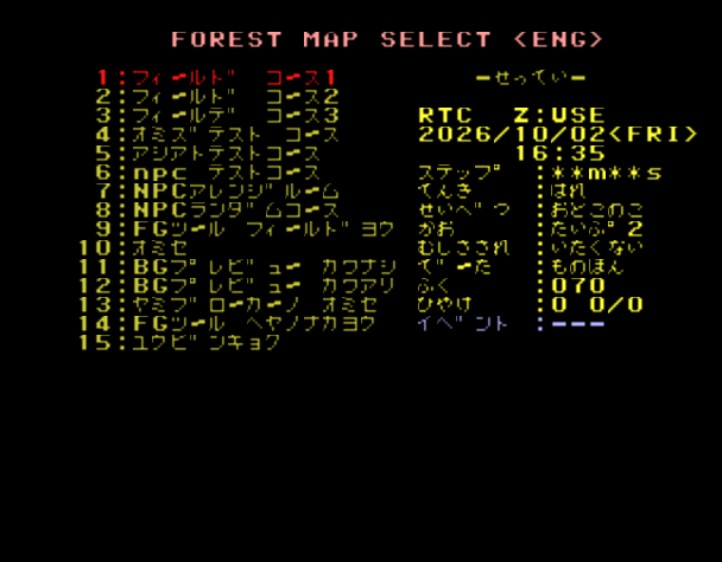
This payload redirects the game's map-loading path to a hidden test map selector. After execution, exit Nook's shop and enter any building to access the test map select screen. Alternatively, you may also soft reset by hitting the reset button on your console after execution. You can return to the test map select screen at any time by entering or exiting any building, or by pressing the reset button on your console. To get rid of this exploit, power-cycle your console by turning it off completely before booting back into the game.
Manual setup instructions for controller
- If you aren’t already playing in English, you’ll need to change your GameCube’s system language to English before launching the game.
- Enter town as any resident and open the notice board in the middle of all the houses. Fill it with dummy posts until it contains 15/15 entries.
- Add three new entries and type the following notice board posts in order:
Enter the following characters EXACTLY as they appear from left to right. If you aren't sure where a character is in-game, click on any individual character below to show its exact position on the default keyboard.Do not confuse the upside-down exclamation (
¡) with lowercasei.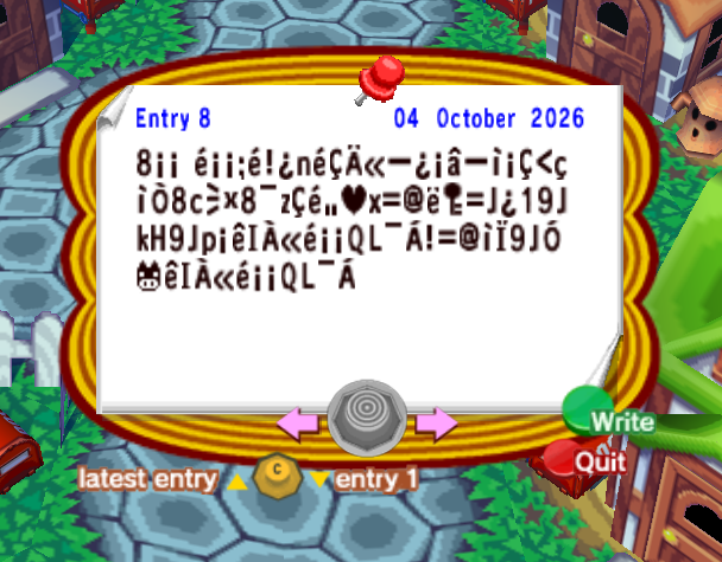
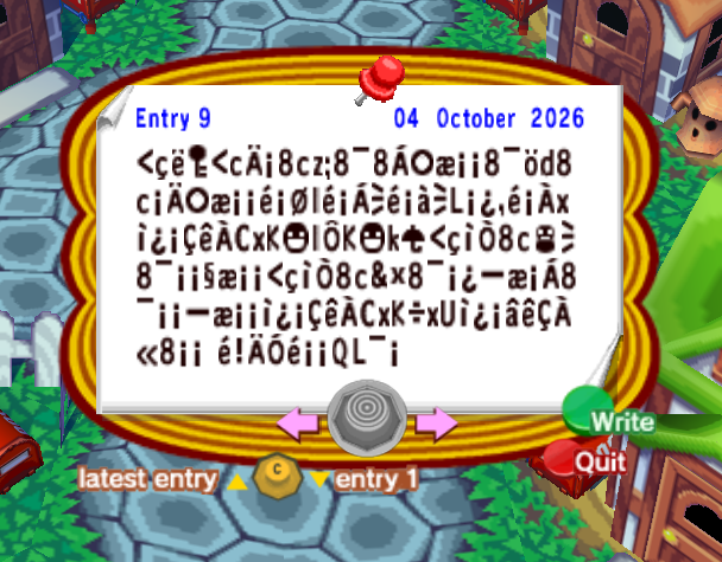
For the next post, start with 116 dummy characters. Here they are commas (
,), but they can be anything: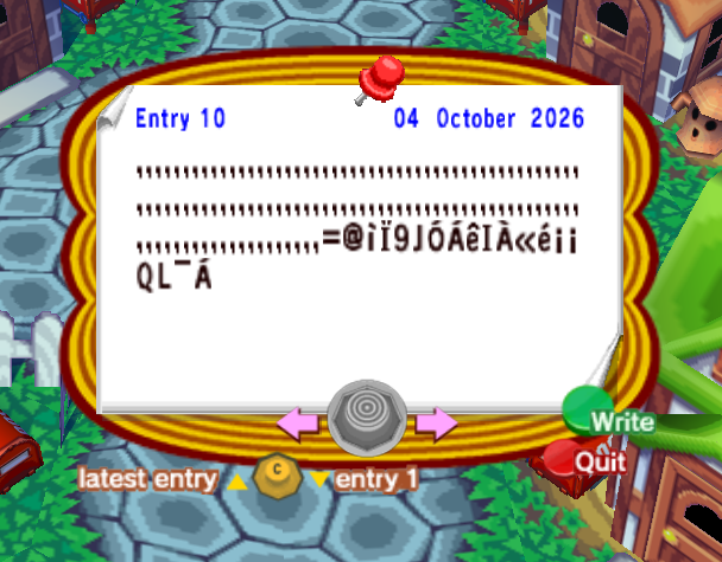
- Add a blank dummy post after these to push back your payload posts. Repeat until your payload posts align exactly with the entries described above.
- If the current date is not already the 2nd, save and quit, then set the in-game date to the 2nd of any month.
- Go to Tom Nook's shop and tell him the following secret code:
mcv9kMNCb5f4ez NooDxK4eLEUAe& - Advance the dialogue and press A or B when Tom Nook starts repeating characters to trigger the payload.
- Exit Nook's shop and enter your house to trigger the test map select screen. Alternatively, simply hitting the reset button on your console and progressing past the title screen will accomplish the same thing.
Raw payload bytes
Post 8 of 15
88 bytes @ 0x8110140438 00 00 20 7C 00 00 D0 7C 21 01 6E 7C 08 02 A6 90 01 00 24 90 81 00 08 3C 60 81 13 38 63 AC C0 38 A0 7A 08 7C A4 2B 78 3D 40 7E D4 3D 4A 01 31 39 4A 6B 48 39 4A 70 00 7D 49 03 A6 7C 00 00 51 4C A0 04 21 3D 40 81 10 39 4A 14 CC 7D 49 03 A6 7C 00 00 51 4C A0 04 20Post 9 of 15
144 bytes @ 0x811014CC3C 60 7E D4 3C 63 02 00 38 63 7A D0 38 A0 38 04 B0 A3 00 00 38 A0 8C 64 38 63 00 02 B0 A3 00 00 7C 00 18 6C 7C 00 04 AC 7C 00 1F AC 4C 00 01 2C 7C 00 03 78 81 01 00 08 7D 03 43 78 4B BF 6C 15 4B BF 6B A9 3C 60 81 13 38 63 AB AC 38 A0 00 00 98 A3 00 00 3C 60 81 13 38 63 26 C0 38 A0 00 01 90 A3 00 04 38 A0 00 00 90 A3 00 00 81 01 00 08 7D 03 43 78 4B C1 78 55 81 01 00 24 7D 08 03 A6 38 00 00 20 7C 21 02 14 7C 00 00 51 4C A0 00 20Post 10 of 15
136 bytes @ 0x811015942C 2C 2C 2C 2C 2C 2C 2C 2C 2C 2C 2C 2C 2C 2C 2C 2C 2C 2C 2C 2C 2C 2C 2C 2C 2C 2C 2C 2C 2C 2C 2C 2C 2C 2C 2C 2C 2C 2C 2C 2C 2C 2C 2C 2C 2C 2C 2C 2C 2C 2C 2C 2C 2C 2C 2C 2C 2C 2C 2C 2C 2C 2C 2C 2C 2C 2C 2C 2C 2C 2C 2C 2C 2C 2C 2C 2C 2C 2C 2C 2C 2C 2C 2C 2C 2C 2C 2C 2C 2C 2C 2C 2C 2C 2C 2C 2C 2C 2C 2C 2C 2C 2C 2C 2C 2C 2C 2C 2C 2C 2C 2C 2C 2C 2C 2C 3D 40 81 10 39 4A 14 04 7D 49 03 A6 7C 00 00 51 4C A0 04 20 Enable Debug Mode 2 / 3 [ Zuru Mode 2 / 3 ] Enables the game's most powerful debug modes 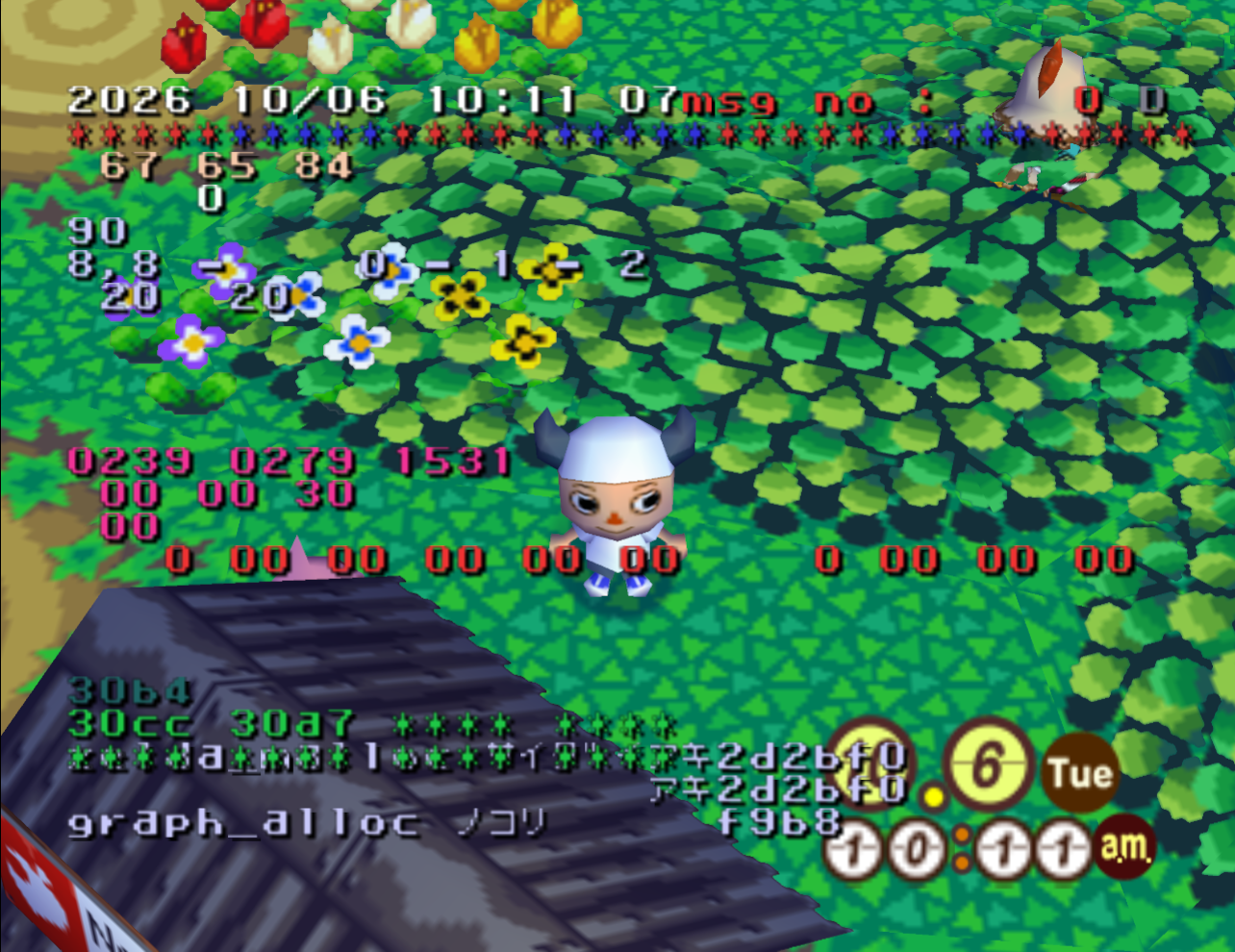
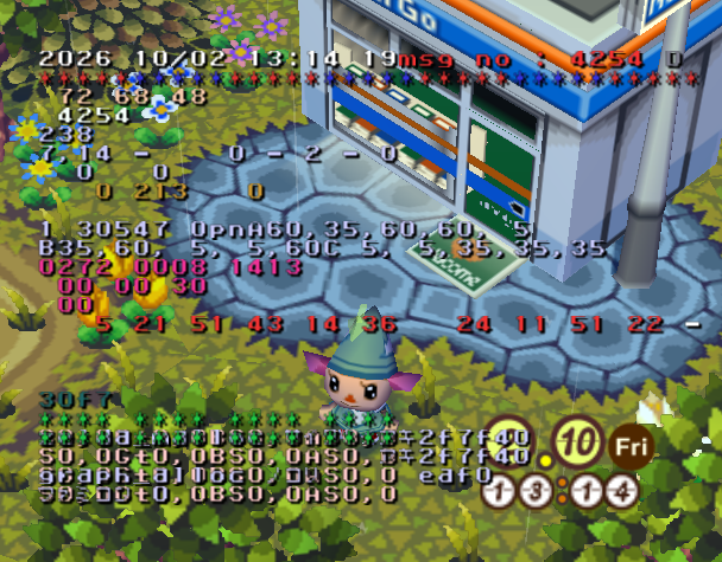
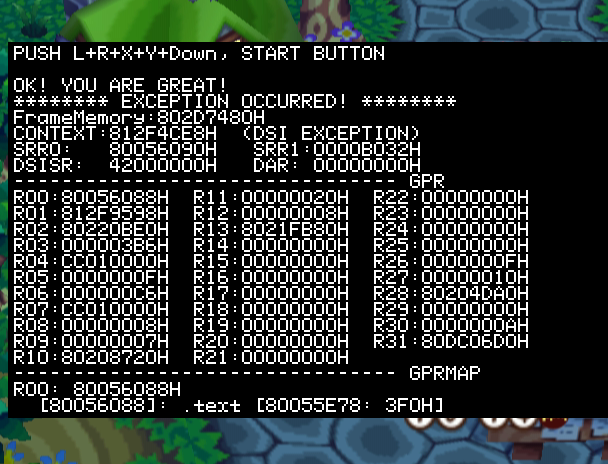
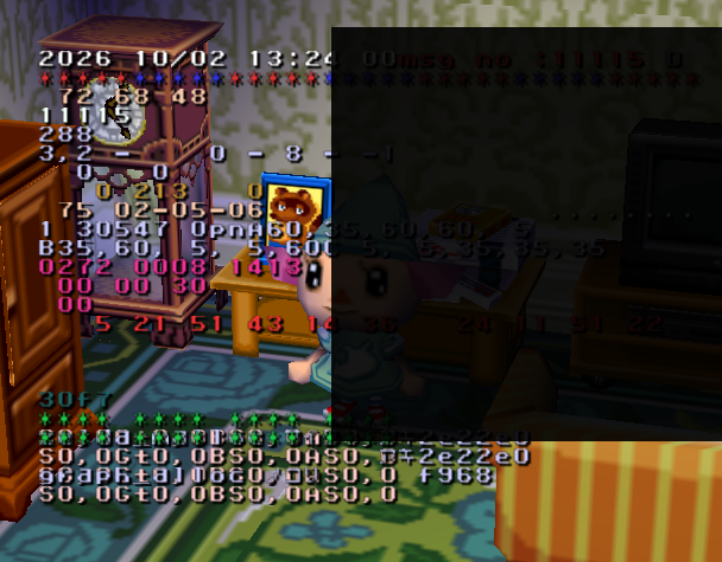
This payload enables all levels of Animal Crossing's debug modes, also known as zuru mode. With levels 2 and 3 enabled, you can spawn any item, control the game speed, and edit memory values on the fly with the in-game overlay. You will need a controller plugged into the second port to control most of this menu. For now, basic information on the functions of this debug mode can be found here.
Manual setup instructions for controller
If your save already has a second player's October diary entry set up, steps 1-3 can be skipped
- If your save does not have a second resident, create one through the startup villager and complete the tutorial until you can enter entries in your diary.
- Enter town as the second resident and create a diary entry in October by interacting with any diary. Fill it with exactly 350 filler characters. Immediately after those characters, type
!iDQ!iDS. - Save and quit back to the title screen. Re-enter town as the first resident.
- Open the notice board in the middle of all the houses. Fill it with dummy posts until it contains 15/15 entries.
- With the notice board full of posts, add new entries and type the following notice board posts in order. When every post is entered, the entries should align as follows:
Enter the following characters EXACTLY as they appear from left to right. If you aren't sure where a character is in-game, click on any individual character below to show its exact position on the default keyboard.Do not confuse the upside-down exclamation (
¡) with lowercasei.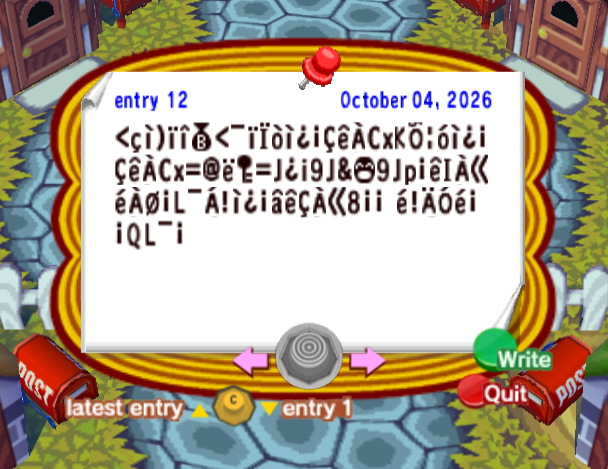
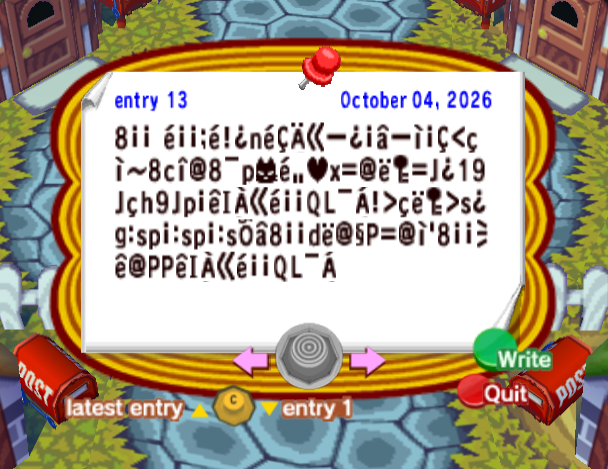
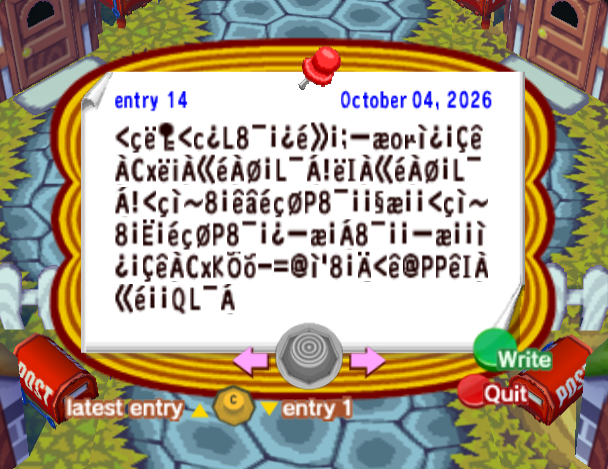
For the next post, start with 116 dummy characters. Here they are commas (
,), but they can be anything: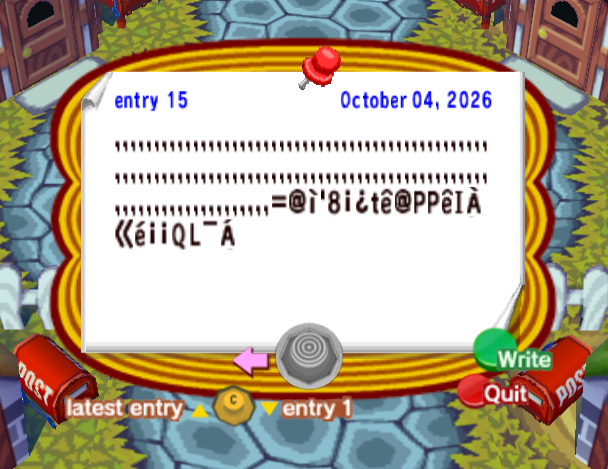
- If the current date is not already the 4th, save and quit, then set the in-game date to the 4th of any month.
- Go to Tom Nook's shop and tell him the following secret code:
x@52ylLzGNNyED UgUGK@n52C2AOn - Advance the dialogue and press A or B when Tom Nook starts repeating characters.
- If successful, a gray letter 'D' should appear on the top right of your screen. Interact with the debug mode by using a controller plugged into the second port.
Raw payload bytes
Post 12 of 15
84 bytes @ 0x8126FDC43C 60 81 29 84 83 C5 3C A0 84 10 88 81 01 00 08 7D 03 43 78 4B 16 97 89 81 01 00 08 7D 03 43 78 3D 40 7E D4 3D 4A 01 69 39 4A 26 BC 39 4A 70 00 7D 49 03 A6 7C 03 18 00 4C A0 04 21 81 01 00 24 7D 08 03 A6 38 00 00 20 7C 21 02 14 7C 00 00 51 4C A0 00 20Post 13 of 15
120 bytes @ 0x8126FE8C38 00 00 20 7C 00 00 D0 7C 21 01 6E 7C 08 02 A6 90 01 00 24 90 81 00 08 3C 60 81 2A 38 63 83 40 38 A0 70 C8 7C A4 2B 78 3D 40 7E D4 3D 4A 01 31 39 4A 60 68 39 4A 70 00 7D 49 03 A6 7C 00 00 51 4C A0 04 21 3E 60 7E D4 3E 73 01 67 3A 73 70 00 3A 73 70 00 3A 73 16 24 38 00 00 64 7E 40 98 50 3D 40 81 27 38 00 00 AC 7D 40 50 50 7D 49 03 A6 7C 00 00 51 4C A0 04 20Post 14 of 15
136 bytes @ 0x8126FF543C 60 7E D4 3C 63 01 4C 38 A0 00 01 7C A5 00 D0 90 A3 6F 9C 81 01 00 08 7D 03 43 78 7E 69 03 A6 7C 03 18 00 4C A0 04 21 7E 49 03 A6 7C 03 18 00 4C A0 04 21 3C 60 81 2A 38 00 7D 24 7C 60 18 50 38 A0 00 00 98 A3 00 00 3C 60 81 2A 38 00 0C 00 7C 60 18 50 38 A0 00 01 90 A3 00 04 38 A0 00 00 90 A3 00 00 81 01 00 08 7D 03 43 78 4B 16 8B 2D 3D 40 81 27 38 00 02 3C 7D 40 50 50 7D 49 03 A6 7C 00 00 51 4C A0 04 20Post 15 of 15
140 bytes @ 0x8127001C2C 2C 2C 2C 2C 2C 2C 2C 2C 2C 2C 2C 2C 2C 2C 2C 2C 2C 2C 2C 2C 2C 2C 2C 2C 2C 2C 2C 2C 2C 2C 2C 2C 2C 2C 2C 2C 2C 2C 2C 2C 2C 2C 2C 2C 2C 2C 2C 2C 2C 2C 2C 2C 2C 2C 2C 2C 2C 2C 2C 2C 2C 2C 2C 2C 2C 2C 2C 2C 2C 2C 2C 2C 2C 2C 2C 2C 2C 2C 2C 2C 2C 2C 2C 2C 2C 2C 2C 2C 2C 2C 2C 2C 2C 2C 2C 2C 2C 2C 2C 2C 2C 2C 2C 2C 2C 2C 2C 2C 2C 2C 2C 2C 2C 2C 2C 3D 40 81 27 38 00 01 74 7D 40 50 50 7D 49 03 A6 7C 00 00 51 4C A0 04 20 This payload enables all levels of Animal Crossing's debug modes, also known as zuru mode. With levels 2 and 3 enabled, you can spawn any item, control the game speed, and edit memory values on the fly with the in-game overlay. You will need a controller plugged into the second port to control most of this menu. For now, basic information on the functions of this debug mode can be found here.
Manual setup instructions for controller
- If you aren’t already playing in English, you’ll need to change your GameCube’s system language to English before launching the game.
- Enter town as any resident and open the notice board in the middle of all the houses. Fill it with dummy posts until it contains 15/15 entries.
- Add three new entries and type the following notice board posts in order:
Enter the following characters EXACTLY as they appear from left to right. If you aren't sure where a character is in-game, click on any individual character below to show its exact position on the default keyboard.Do not confuse the upside-down exclamation (
¡) with lowercasei.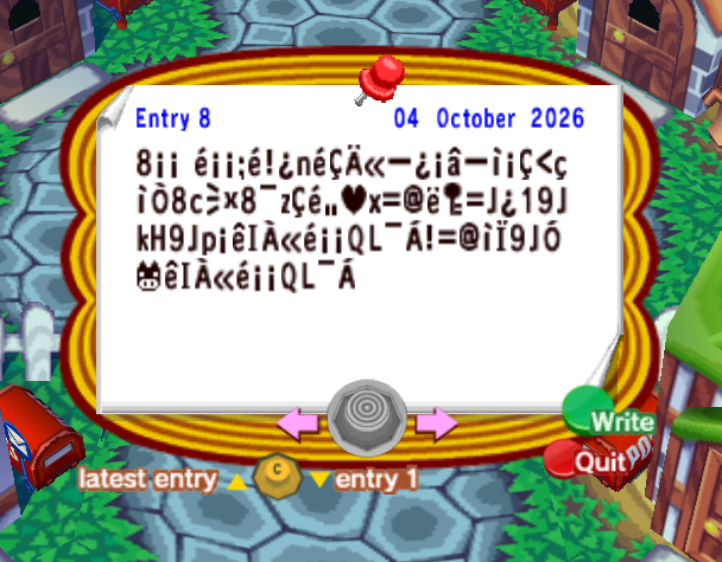
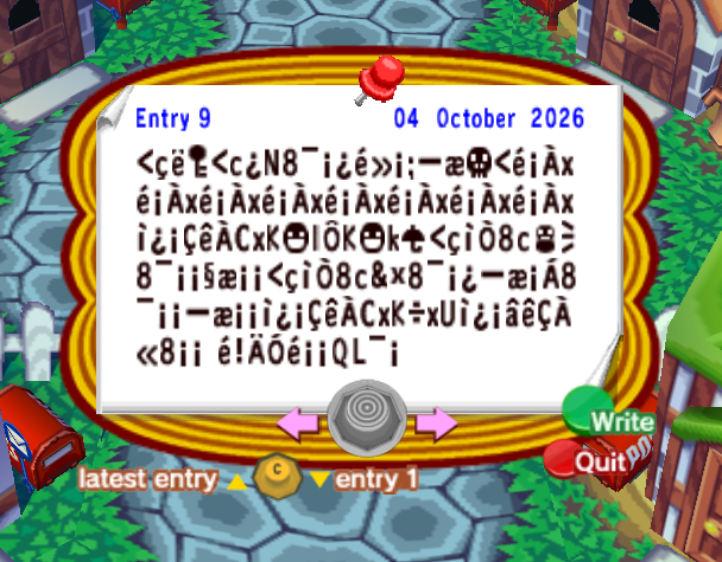
For the next post, start with 116 dummy characters. Here they are commas (
,), but they can be anything: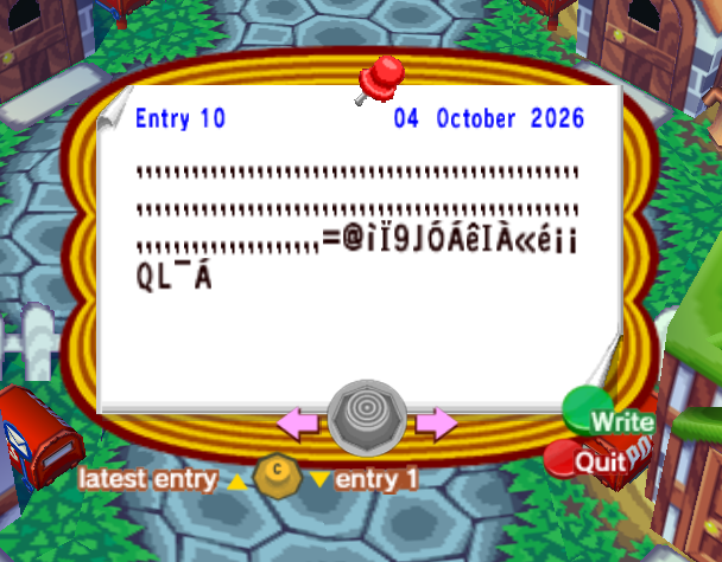
- Add dummy posts after these until the three payload posts align exactly with entries 8, 9, and 10.
- If the current date is not already the 2nd, save and quit, then set the in-game date to the 2nd of any month.
- Go to Tom Nook's shop and tell him the following secret code:
mcv9kMNCb5f4ez NooDxK4eLEUAe& - Advance the dialogue and press A or B when Tom Nook starts repeating characters.
- If successful, a gray letter 'D' should appear on the top right of your screen. Interact with the debug mode by using a controller plugged into the second port.
Raw payload bytes
Post 8 of 15
88 bytes @ 0x8110140438 00 00 20 7C 00 00 D0 7C 21 01 6E 7C 08 02 A6 90 01 00 24 90 81 00 08 3C 60 81 13 38 63 AC C0 38 A0 7A 08 7C A4 2B 78 3D 40 7E D4 3D 4A 01 31 39 4A 6B 48 39 4A 70 00 7D 49 03 A6 7C 00 00 51 4C A0 04 21 3D 40 81 10 39 4A 14 CC 7D 49 03 A6 7C 00 00 51 4C A0 04 20Post 9 of 15
144 bytes @ 0x811014CC3C 60 7E D4 3C 63 01 4E 38 A0 00 01 7C A5 00 D0 90 A3 BA 3C 7C 00 03 78 7C 00 03 78 7C 00 03 78 7C 00 03 78 7C 00 03 78 7C 00 03 78 7C 00 03 78 7C 00 03 78 81 01 00 08 7D 03 43 78 4B BF 6C 15 4B BF 6B A9 3C 60 81 13 38 63 AB AC 38 A0 00 00 98 A3 00 00 3C 60 81 13 38 63 26 C0 38 A0 00 01 90 A3 00 04 38 A0 00 00 90 A3 00 00 81 01 00 08 7D 03 43 78 4B C1 78 55 81 01 00 24 7D 08 03 A6 38 00 00 20 7C 21 02 14 7C 00 00 51 4C A0 00 20Post 10 of 15
136 bytes @ 0x811015942C 2C 2C 2C 2C 2C 2C 2C 2C 2C 2C 2C 2C 2C 2C 2C 2C 2C 2C 2C 2C 2C 2C 2C 2C 2C 2C 2C 2C 2C 2C 2C 2C 2C 2C 2C 2C 2C 2C 2C 2C 2C 2C 2C 2C 2C 2C 2C 2C 2C 2C 2C 2C 2C 2C 2C 2C 2C 2C 2C 2C 2C 2C 2C 2C 2C 2C 2C 2C 2C 2C 2C 2C 2C 2C 2C 2C 2C 2C 2C 2C 2C 2C 2C 2C 2C 2C 2C 2C 2C 2C 2C 2C 2C 2C 2C 2C 2C 2C 2C 2C 2C 2C 2C 2C 2C 2C 2C 2C 2C 2C 2C 2C 2C 2C 2C 3D 40 81 10 39 4A 14 04 7D 49 03 A6 7C 00 00 51 4C A0 04 20 Spawn the Forbidden Four NES Games Places Ice Climber, Mario Bros., Super Mario Bros., and The Legend of Zelda in your inventory 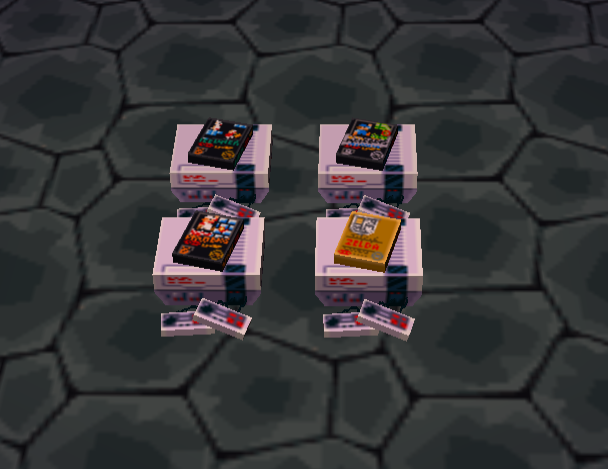
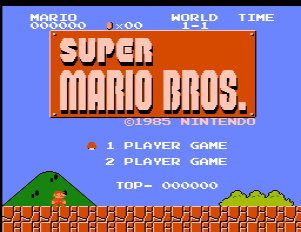
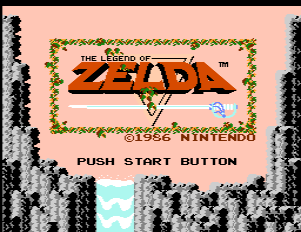
This payload replaces the first four slots of player one's inventory with the NES games Ice Climber, Mario Bros., Super Mario Bros., and The Legend of Zelda. The last two are complete NES items present in the game's data, but remained unobtainable on a vanilla console without external tools. Note that this will overwrite anything in the first four slots of your inventory, so be careful!
Manual setup instructions for controller
If your save already has a second player's October diary entry set up, steps 1-3 can be skipped
- If your save does not have a second resident, create one through the startup villager and complete the tutorial until you can enter entries in your diary.
- Enter town as the second resident and create a diary entry in October by interacting with any diary. Fill it with exactly 350 filler characters. Immediately after those characters, type
!iDQ!iDS. - Save and quit back to the title screen. Re-enter town as the first resident.
- Open the notice board in the middle of all the houses. Fill it with dummy posts until it contains 15/15 entries.
- With the notice board full of posts, add new entries and type the following notice board posts in order. When every post is entered, the entries should align as follows:
Enter the following characters EXACTLY as they appear from left to right. If you aren't sure where a character is in-game, click on any individual character below to show its exact position on the default keyboard.Do not confuse the upside-down exclamation (
¡) with lowercasei.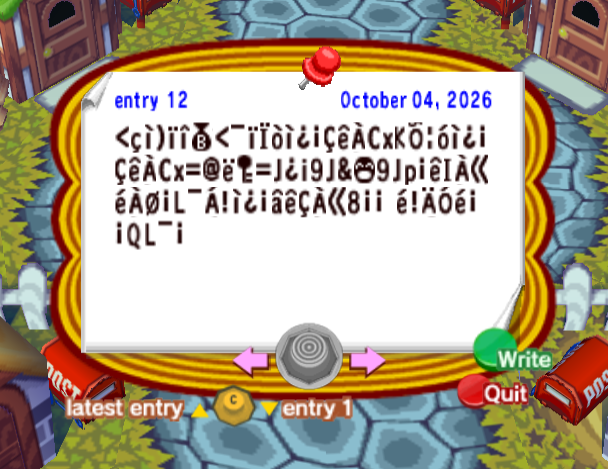
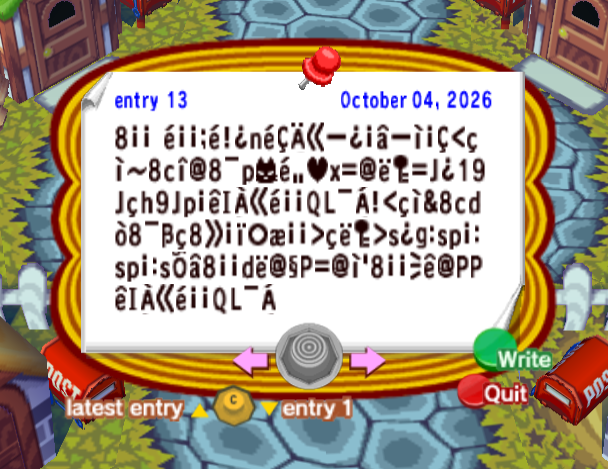
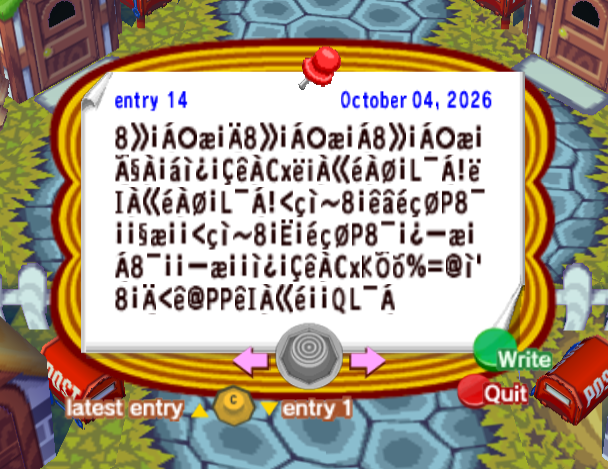
For the next post, start with 116 dummy characters. Here they are commas (
,), but they can be anything: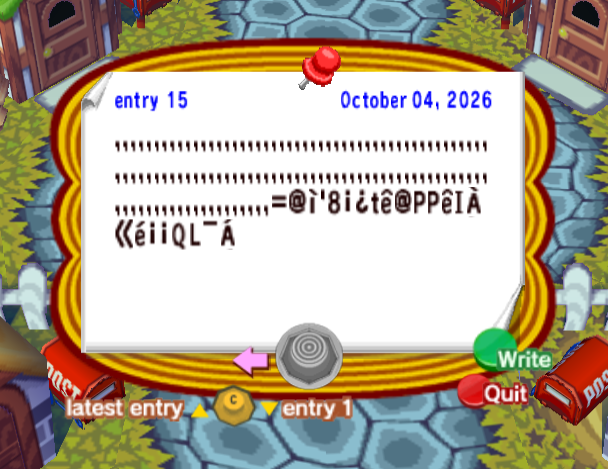
- If the current date is not already the 4th, save and quit, then set the in-game date to the 4th of any month.
- Go to Tom Nook's shop and tell him the following secret code:
x@52ylLzGNNyED UgUGK@n52C2AOn - Advance the dialogue and press A or B when Tom Nook starts repeating characters. Afterwards, check your inventory for the four NES games.
Raw payload bytes
Post 12 of 15
84 bytes @ 0x8126FDC43C 60 81 29 84 83 C5 3C A0 84 10 88 81 01 00 08 7D 03 43 78 4B 16 97 89 81 01 00 08 7D 03 43 78 3D 40 7E D4 3D 4A 01 69 39 4A 26 BC 39 4A 70 00 7D 49 03 A6 7C 03 18 00 4C A0 04 21 81 01 00 24 7D 08 03 A6 38 00 00 20 7C 21 02 14 7C 00 00 51 4C A0 00 20Post 13 of 15
140 bytes @ 0x8126FE8C38 00 00 20 7C 00 00 D0 7C 21 01 6E 7C 08 02 A6 90 01 00 24 90 81 00 08 3C 60 81 2A 38 63 83 40 38 A0 70 C8 7C A4 2B 78 3D 40 7E D4 3D 4A 01 31 39 4A 60 68 39 4A 70 00 7D 49 03 A6 7C 00 00 51 4C A0 04 21 3C 60 81 26 38 63 64 88 38 A0 1D 60 38 A5 00 84 B0 A3 00 00 3E 60 7E D4 3E 73 01 67 3A 73 70 00 3A 73 70 00 3A 73 16 24 38 00 00 64 7E 40 98 50 3D 40 81 27 38 00 00 AC 7D 40 50 50 7D 49 03 A6 7C 00 00 51 4C A0 04 20Post 14 of 15
144 bytes @ 0x8126FF5438 A5 00 04 B0 A3 00 02 38 A5 00 04 B0 A3 00 04 38 A5 00 04 B0 A3 00 06 98 03 00 23 81 01 00 08 7D 03 43 78 7E 69 03 A6 7C 03 18 00 4C A0 04 21 7E 49 03 A6 7C 03 18 00 4C A0 04 21 3C 60 81 2A 38 00 7D 24 7C 60 18 50 38 A0 00 00 98 A3 00 00 3C 60 81 2A 38 00 0C 00 7C 60 18 50 38 A0 00 01 90 A3 00 04 38 A0 00 00 90 A3 00 00 81 01 00 08 7D 03 43 78 4B 16 8B 25 3D 40 81 27 38 00 02 3C 7D 40 50 50 7D 49 03 A6 7C 00 00 51 4C A0 04 20Post 15 of 15
140 bytes @ 0x8127001C2C 2C 2C 2C 2C 2C 2C 2C 2C 2C 2C 2C 2C 2C 2C 2C 2C 2C 2C 2C 2C 2C 2C 2C 2C 2C 2C 2C 2C 2C 2C 2C 2C 2C 2C 2C 2C 2C 2C 2C 2C 2C 2C 2C 2C 2C 2C 2C 2C 2C 2C 2C 2C 2C 2C 2C 2C 2C 2C 2C 2C 2C 2C 2C 2C 2C 2C 2C 2C 2C 2C 2C 2C 2C 2C 2C 2C 2C 2C 2C 2C 2C 2C 2C 2C 2C 2C 2C 2C 2C 2C 2C 2C 2C 2C 2C 2C 2C 2C 2C 2C 2C 2C 2C 2C 2C 2C 2C 2C 2C 2C 2C 2C 2C 2C 2C 3D 40 81 27 38 00 01 74 7D 40 50 50 7D 49 03 A6 7C 00 00 51 4C A0 04 20 This payload replaces the first four slots of player one's inventory with the NES games Ice Climber, Mario Bros., Super Mario Bros., and The Legend of Zelda. The last two are complete NES items present in the game's data, but remained unobtainable on a vanilla console without external tools. Note that this will overwrite anything in the first four slots of your inventory, so be careful!
Manual setup instructions for controller
- If you aren’t already playing in English, you’ll need to change your GameCube’s system language to English before launching the game.
- Enter town as any resident and open the notice board in the middle of all the houses. Fill it with dummy posts until it contains 15/15 entries.
- Add three new entries and type the following notice board posts in order:
Enter the following characters EXACTLY as they appear from left to right. If you aren't sure where a character is in-game, click on any individual character below to show its exact position on the default keyboard.Do not confuse the upside-down exclamation (
¡) with lowercasei.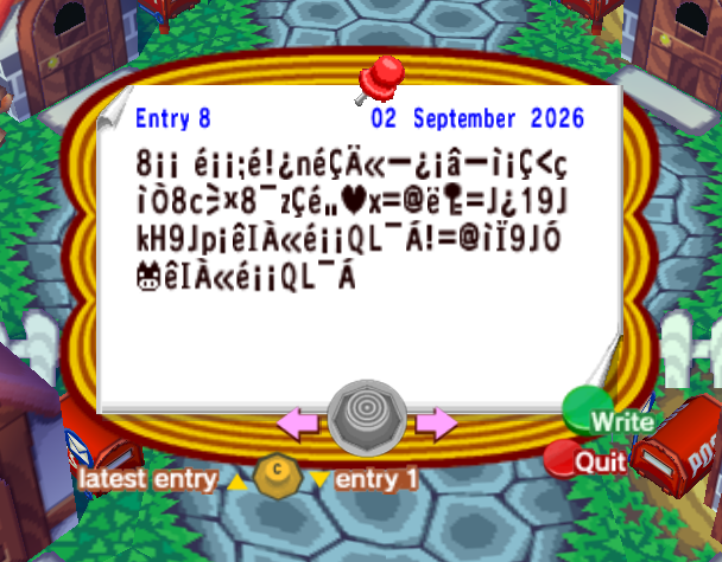
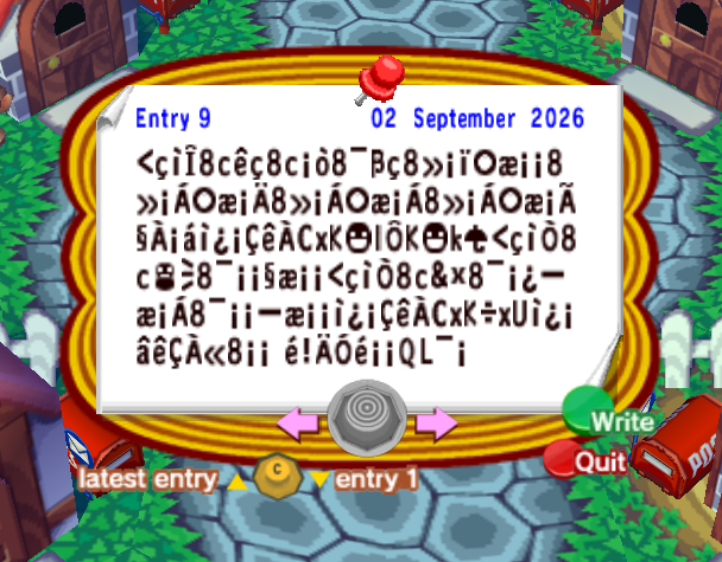
For the next post, start with 116 dummy characters. Here they are commas (
,), but they can be anything: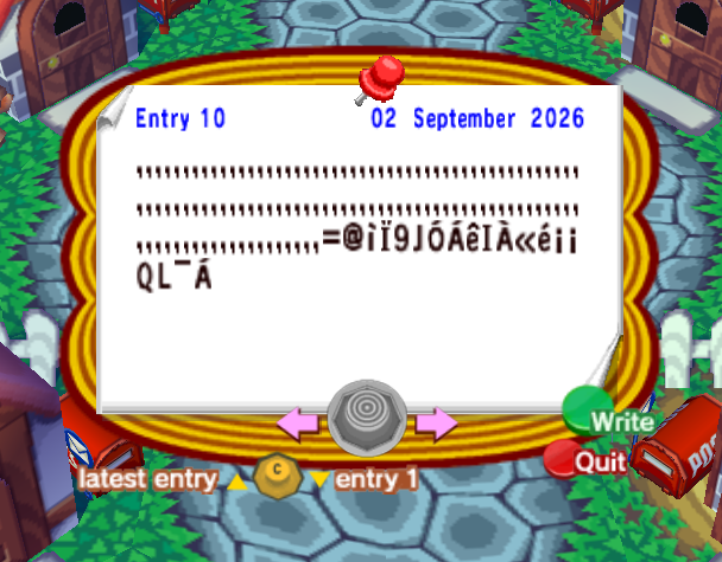
- Add dummy posts after these until the three payload posts align exactly with entries 8, 9, and 10.
- If the current date is not already the 2nd, save and quit, then set the in-game date to the 2nd of any month.
- Go to Tom Nook's shop and tell him the following secret code:
mcv9kMNCb5f4ez NooDxK4eLEUAe& - Advance the dialogue and press A or B when Tom Nook starts repeating characters. Afterwards, check your inventory for the NES games.
Raw payload bytes
Post 8 of 15
88 bytes @ 0x8110140438 00 00 20 7C 00 00 D0 7C 21 01 6E 7C 08 02 A6 90 01 00 24 90 81 00 08 3C 60 81 13 38 63 AC C0 38 A0 7A 08 7C A4 2B 78 3D 40 7E D4 3D 4A 01 31 39 4A 6B 48 39 4A 70 00 7D 49 03 A6 7C 00 00 51 4C A0 04 21 3D 40 81 10 39 4A 14 CC 7D 49 03 A6 7C 00 00 51 4C A0 04 20Post 9 of 15
144 bytes @ 0x811014CC3C 60 81 0F 38 63 7D 60 38 63 00 88 38 A0 1D 60 38 A5 00 84 B0 A3 00 00 38 A5 00 04 B0 A3 00 02 38 A5 00 04 B0 A3 00 04 38 A5 00 04 B0 A3 00 06 98 03 00 23 81 01 00 08 7D 03 43 78 4B BF 6C 15 4B BF 6B A9 3C 60 81 13 38 63 AB AC 38 A0 00 00 98 A3 00 00 3C 60 81 13 38 63 26 C0 38 A0 00 01 90 A3 00 04 38 A0 00 00 90 A3 00 00 81 01 00 08 7D 03 43 78 4B C1 78 55 81 01 00 24 7D 08 03 A6 38 00 00 20 7C 21 02 14 7C 00 00 51 4C A0 00 20Post 10 of 15
136 bytes @ 0x811015942C 2C 2C 2C 2C 2C 2C 2C 2C 2C 2C 2C 2C 2C 2C 2C 2C 2C 2C 2C 2C 2C 2C 2C 2C 2C 2C 2C 2C 2C 2C 2C 2C 2C 2C 2C 2C 2C 2C 2C 2C 2C 2C 2C 2C 2C 2C 2C 2C 2C 2C 2C 2C 2C 2C 2C 2C 2C 2C 2C 2C 2C 2C 2C 2C 2C 2C 2C 2C 2C 2C 2C 2C 2C 2C 2C 2C 2C 2C 2C 2C 2C 2C 2C 2C 2C 2C 2C 2C 2C 2C 2C 2C 2C 2C 2C 2C 2C 2C 2C 2C 2C 2C 2C 2C 2C 2C 2C 2C 2C 2C 2C 2C 2C 2C 2C 3D 40 81 10 39 4A 14 04 7D 49 03 A6 7C 00 00 51 4C A0 04 20